Clarity for parents

Growing up.
With you beside them.

Their first chats. A little more independence. A lot of new questions. Clarity helps you find a thoughtful balance between guidance and room to grow.

A mother and daughter sharing a smile on a sunny coast
Editorial image generated with AI.

Their world is getting bigger

The first hello.
A thoughtful start.

Who is on the other side? When is it time to put the phone down? Contacts and chat hours give your family something concrete to agree on.

In Clarity, children can keep in touch without sharing a phone number. Family chat keeps everyday arrangements close; contact rules and reporting help you discuss what feels right.

Explore Clarity Chat
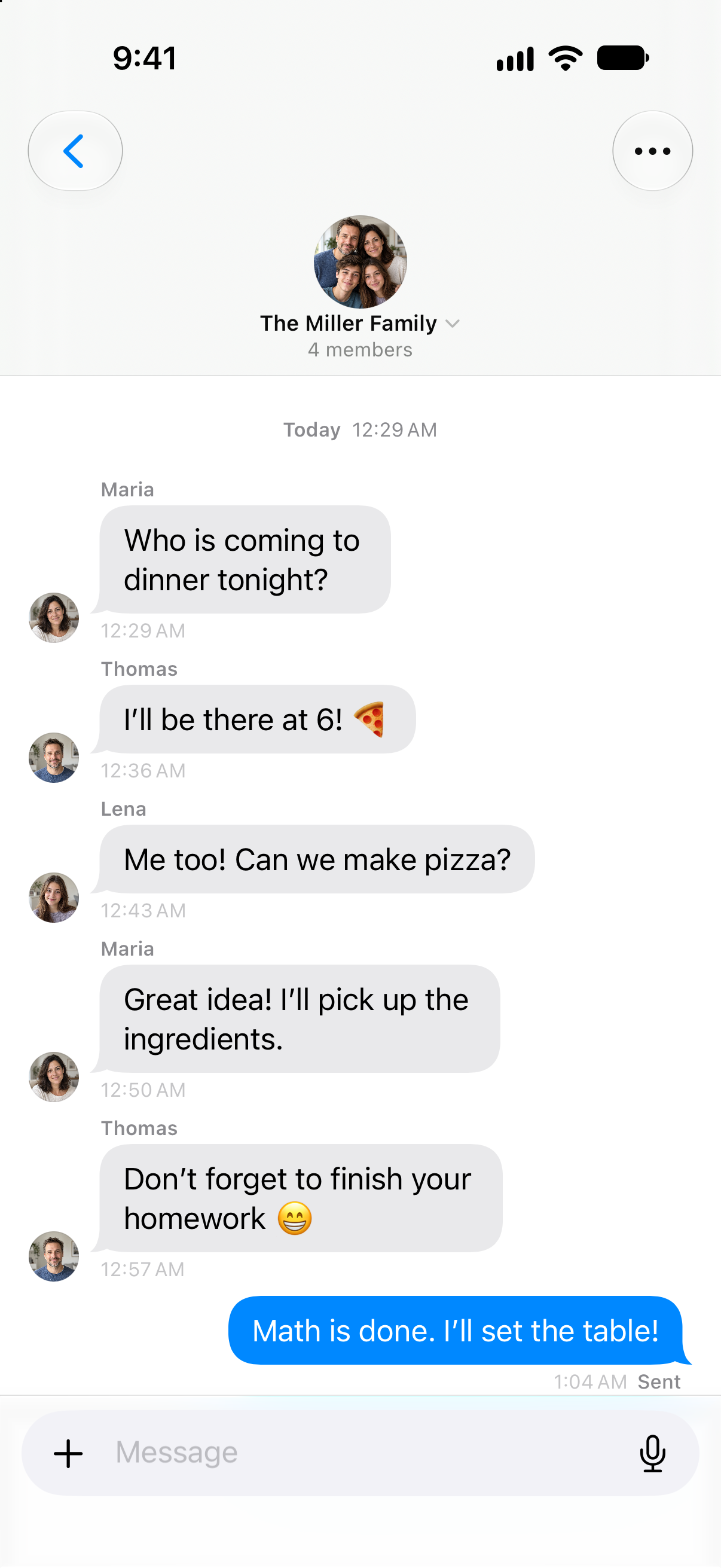
Clarity family chat: the family agrees on pizza, shopping and setting the table. Native app with example data.
One question.

Native app with example data. Illustrative animation.

A useful place to begin

A little older.
A different kind of day.

A school day is different from a day off. A ten-year-old has different needs from a teenager. Explore how Clarity's starting proposals change — then make the agreement your own.

10years
What kind of day?
Leisure media
45min

An adjustable starting point

01 / 03 · Time to explore

Their interests.A place in the day.

A video, a game, something new to explore. Clarity offers a starting allowance for leisure media. A day off can leave more room than a school day.

Schoolwork stays outside the leisure allowance.

Where do these proposals come from?

These are adjustable Clarity product defaults, not scientifically prescribed minutes. The sources explain the wider context. This website illustrates a proposal; it does not change app settings. AAP · 5 Cs ↗

How the guidance works

Clarity Family · Hours & Limits

A thoughtful framework.For your everyday life.

Agree on a framework together. Clarity shows what is prepared and what still needs setup on your child's iPhone.

A framework you choose together

Different days.
Different allowances.

After class and homework, there is room for personal interests.

1 hr 30 min

Choose a day and adjust its example allowance. Each kind of day keeps its own value.

Leisure apps

90min

per day · School day

School day
90 min
Day off
120 min

Chosen together. Shaped around your day.

Setup status

Know what is actually set up.

Set up the agreed allowance on the connected child’s device. Clarity shows when Screen Time permission is still needed. Chat hours have their own setting.

See the setup steps
Lena’s iPhone · examplePrepared

Screen Time permission is still needed on Lena's iPhone.

Interactive website demo with example data. No settings are changed. Clarity chat hours work separately from app limits; enforcing those limits requires setup on the child's device.

The details make the difference

More independence.
A little guidance beside it.

A family enjoying pizza together on a sunny terrace
AI-generated editorial image

Contacts & chat

Their friendships.
Your shared agreement.

Friends matter. So does knowing what you have agreed. Contact choices, daily chat time and quiet hours come together in a view you can understand.

LenaExample agreement

Choose approved accounts, or require mutually accepted contacts. The current agreement makes the rule visible.


Discover Clarity Chat

School & personal space

Be there.
With permission.

Support starts with trust. Your child chooses who may see school information, and can end that sharing again.

Who can see my school dataNobody

Example setting: school information is not shared.

Explore sharing

Apps & Screen Time

Agree together.
Set up with care.

App choices and time budgets need the child's connected iPhone. Clarity shows the next step, including the required Apple permission.

Lena’s iPhoneScreen Time · setup example
Plan preparedYour next step
Permission on the iPhoneAfterwards
Check the setupAfterwards

A prepared plan still needs setup on the child's device.

See the setup

Product details with example data. Rules depend on the family connection, confirmed roles, age and permissions.

Room for each other. Space for yourself.

Together. With spaceto be yourself.

Sharing everyday life doesn’t mean sharing an account. Clarity makes room for what brings you together — and what each person keeps to themselves.

Be there for school. By Lena’s choice.

Maria asks. Lena chooses whether to share her school report. She decides when Maria can take a look — and when sharing ends.

Maria

Parent · Own account

How’s school
going?

Sometimes a shared view helps. With the school report Lena chooses to share, Maria can follow along — from the timetable to the next exam.

No report yet

Nothing is shared before Lena agrees.

Lena chooses

Lena’s school

Her school report
  • School profile
  • Subjects and grades
  • Assignments and exams
  • Timetable
  • Study activity

Maria has asked

And when there’s a date to remember?
Family calendar

An event only becomes its own calendar copy when someone chooses to add it.

Family calendar

No event copied

The flow is closed. Lena can choose to allow the request.

Chats, Journal and Health are not part of the school report.

Interactive example with a fictional family. It doesn’t change any accounts or permissions.

More about privacy

Made for real family life

Many questions.
A place to work through them.

01

Contacts & chat hours

Review who your child can chat with and agree on times for Clarity chat. Other messaging apps have their own controls.

02

Apps & daily allowance

Choose apps and categories, prepare a time budget and check setup on your child's iPhone.

03

Content & purchases

Understand controls for age ratings, explicit content and in-app purchases, including what Apple's controls cover.

04

School by permission

Your child chooses who sees their school information. The current choice stays visible in the Family Hub.

05

Help in a difficult moment

Block a contact or report selected messages. A signal is a reason to ask questions; it is not a diagnosis or a guarantee of protection.

06

A shared everyday life

Family chat, tasks and shopping have one home. Everyone keeps their own account and personal space.

Understand the why

Good guidance.
Sources you can read.

Clarity explains the reasoning beside a setting. Research, professional guidance and product defaults each have a clear role.

AAP · Pediatric guidance

Look at the whole child.

The 5 Cs consider the child, content, emotional needs, what media displaces, and communication.

Read original source

AASM · Scientific consensus

Leave room for sleep.

For ages 6–12: 9–12 hours per 24 hours. For ages 13–18: 8–10 hours. Individual needs vary. Paruthi et al., 2016.

Read original source

eSafety · Practical guidance

Stay in the conversation.

Parental controls can help. Understanding the settings together and staying approachable still matter.

Read original source

These sources support the explanation of a setting. They are not an endorsement of Clarity or evidence that its use guarantees an outcome.

Clarity Family

Less guesswork.
More being there.

Discover the Family plan, its included features and what your family needs to get started.

Family setup · try the example

Two accounts.
One family.

Your child has an account of their own. You send a personal invitation, they accept it. Both of you can see when you’re connected.

The complete setup guide
MariaMariaOrganiser
LenaLenaChild account

Your family

A personal invitation.

The Miller FamilyInvitation for Lena

Check the profile and role before inviting. The invitation is valid for seven days.

Interactive example. No real invitation is sent.

Clarity plan advisor

No sign-in needed

Your selection: Family

Your plans. Your Clarity.

What would you like to make easier? Discover the features that help and the plan that fits.

AI answers when available. Otherwise, the plan guide can help.

Enter sends · Shift + Enter for a new line

Clarity for parents