
Without a phone number
Find people by username or Clarity ID. A contact request and its acceptance connect you.
Clarity Chat
Messages, photos, videos and your voice. One to one, in a group or with family. Plus voice and video calls and thoughtful parental controls — connected through your Clarity account.
Family chat
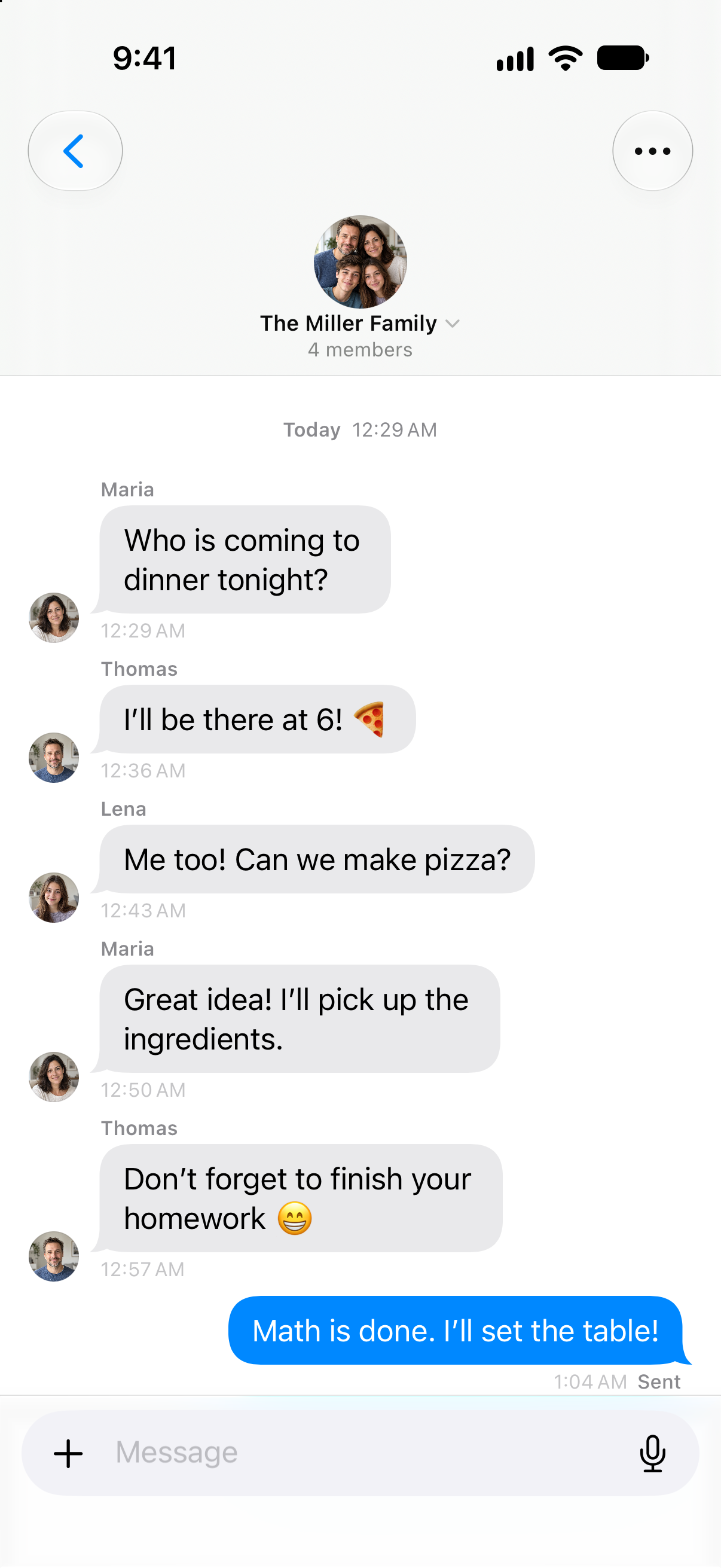
A quick reply keeps everyone on the same page. Put lasting tasks in the Family Hub afterwards so they stay easy to find.

Inside the app
Maths is done. I'll set the table!
Everyone can add their part. Put lasting to-dos in the Family Hub so they remain easy to find after the conversation.
Original Clarity app view from 28 September 2026 with fictional example data. Interactive details are recreated on this website.
Your people. Your choice.
Find each other by username or Clarity ID. A contact request gives both people a choice. Once accepted, your conversation can begin.
A connection you both choose.

CL-LENA-DEMOWith a contact request, you both decide whether you’d like to chat.
So much more than a message
A photo says it. Your voice explains it. A file keeps everyone moving. Choose a format and try a small part of the experience.

Three moments. One album.
01 / 06 · Photos
The day out, the whiteboard, your first homemade cake. Share one photo or an album. Add a caption so everyone knows the story behind it.
Interactive product illustrations with fictional content. No messages are sent. Photos and videos are editorial examples.
Hear each other. See each other.


Interactive simulation · generated example portraits
A familiar face. A quick question. A moment you want to share. Start the call right from your conversation, without exchanging phone numbers.
Your camera. On your terms.
Mute with a tap.
Back to the chat. Still connected.
Calls connect two confirmed contacts. This demo uses example images and stays silent.
Everyone who belongs
The study group. Your family. The people you make plans with. Give each conversation a name and picture, and keep the important things close.

Today 14:30
Worksheet for Friday is here.
Perfect, let’s go through it together.
Read 14:32
Example group · try search, media and pinned messages
Clarity Family
The first chats bring new questions. Clarity gives parents and children concrete ways to agree on contacts, chat hours and personal space.
Family settings depend on age, role and setup. Signals do not detect every difficult situation and cannot replace a conversation.
Clarity Chat · In depth
Messages are the beginning. Voice, media, files, calls and groups give each situation its own form.
No. Find each other by exact username or Clarity ID. A request and its acceptance connect you. These paths require an available Clarity account.
Groups bring together messages and content from several members. Voice and video calls connect two confirmed contacts. A group chat is not a promise of a group video call.
Family provides contact rules, chat hours and daily allowances, plus blocking, reporting and chat signals. Setup follows age, role and permission. These tools do not replace a conversation or detect every concern.
Find people by username or Clarity ID. A contact request and its acceptance connect you.
Share individual photos or an album with a caption. Open the images from your conversation.
Choose a video, review the preview and share it with a contact or group.
Record, review your draft and send. Playback position and speed controls help with listening.
Call a confirmed direct contact, with microphone controls and camera switching for video.
Find a reaction and review it before sending. Clarity stickers are available in the attachment menu.
Share documents and links with context and return to them in the conversation.
Deliberately share a map pin that the other person can open in Maps.
Shared conversations with a name, picture and members. Families have their own group chat.
Filter conversations, search messages, pin important information and find shared content.
Use Clarity Family to agree on age-appropriate contacts, chat hours and allowances. Blocking, reporting and chat signals help with concerns.
A closer look
Clarity Chat uses usernames and Clarity IDs to connect available accounts. Share your contact address or search for a particular person. A contact request and acceptance connect you. Your public contact identity is separate from private conversation contents; finding a username does not grant access to another person's messages or their personal Clarity records.
Begin an arrangement with somebody new without exchanging phone numbers.
Groups have their own name, image and members. The group filter makes them reachable in the conversation list; family conversations have a separate filter. You choose which conversation to open and where to send a message. An existing group does not automatically share your private school, journal or Health information with its members.
Keep shared work in its own conversation instead of mixing it with every personal discussion.
Write a message in the individual or group conversation you have opened. The text belongs to that conversation and can be read again in its history. Arrangements remain messages even when they mention tasks or dates. To make something a saved part of your plan, deliberately enter it in the appropriate Clarity area.
Discuss an arrangement and then decide yourself what belongs in your plan.
The attachment flow lets you select individual photos or several images and add a caption. Shared images can be opened in the conversation. Their context comes from your choice and message, rather than automatic analysis of every photo on the device. You decide which image belongs with this particular person or group.
A sketch or shared detail appears in the place where you are discussing it.
Narrow the list to unread, group or family conversations; pinned conversations remain separately reachable. Inside an open chat, search for messages. These are two different steps: first find the right conversation, then read a particular passage within it. The search remains tied to the conversation area your account is allowed to access.
Return to the relevant arrangement without reading the entire history again.
Your next step
Start with the functions included in Free. Compare the plans when you want to go further.
Technical specification
Consequence classes describe only actions prepared by Clarity. What you enter or start directly remains your own action.
Updated27 September 2026
The plan conditions and boundaries named on this page still apply.
Personal, group and family conversations with their authorised content.
No execution path required.
Search and filters only read. Messages and permissions remain direct actions of the people involved.
No separate published quantity exists for conversations and attachments.
A date in a message does not automatically become a task today.