A teacher discussing work with three learners

Editorial visualisation

Clarity for teachers

More room to teach.

From the first look at your class to the material for your next lesson. Bring preparation, attendance and assessment together, with every teaching decision in your hands.

Start with your class.

Your class at a glance

Your class. One place to begin.

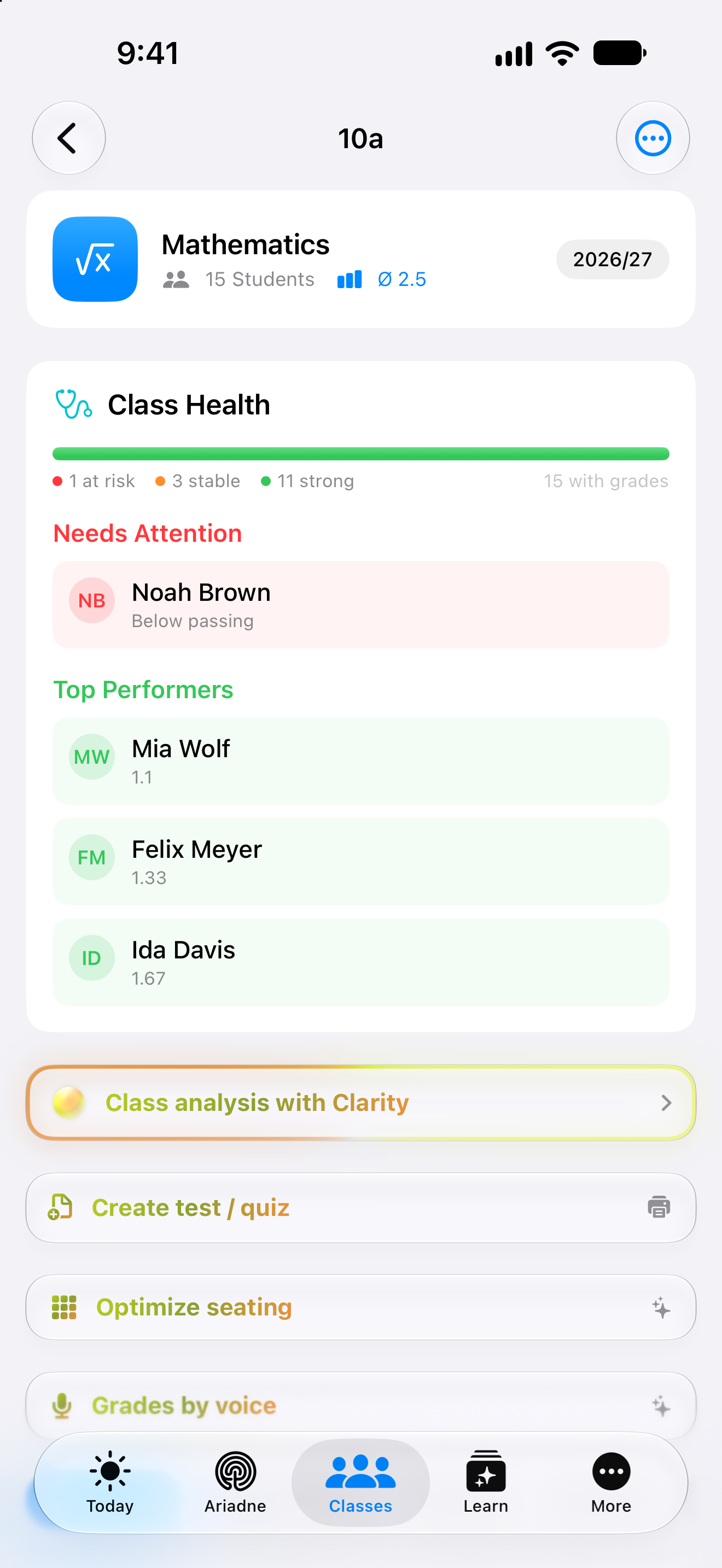
Open class 10a and find students, assignments and recorded grades together. Move straight to attendance, a test draft or your lesson history. Your class is the starting point for the work ahead.

See the detail
A class average offers an overview. Individual grades and your own observations provide the context behind it.
All Teacher features
Original Clarity class view with fictional grades
Original app capture · example data

In the classroom

For the little things.
That fill your day.

Who’s here? Who sits where? What comes next? Your class brings the everyday details together, so you can return your attention to the room.

10a
AttendanceMathematics · Class 10a
Friday, 25 September
3Present
0Absent
1Late
0Excused
Mia WeberPresent
Noah FischerLate
Felix WagnerPresent
Ida HoffmannPresent
01 / 03

A small action. A complete register.

Mark everyone present, then update the exceptions. Four distinct statuses keep a late arrival separate from an excused absence.

By day

Attendance belongs to the selected date. Return to that day to review or correct a record.

Interactive website illustration · Fictional class and records. The app offers additional students, dates and room sizes.

Grades by voice

Say it. Check it. Save it.

“Mia, two. Felix, one.”

Dictate grades you’ve decided on. With the AI feature enabled, Clarity prepares student matches and values for review. Check the names and scale, add an assignment or reason, then explicitly save. Unclear matches need your attention.

After the test

The suggestion is only a start.

Clarity brings a transcribed answer, criterion and marking suggestion together. The teacher can review and correct each part.

Example · linear functions01 / 03
On the worksheetMathematics · question 3
2 points

Where does f(x) = 3x − 5 cross the y-axis? Explain your answer.

Answer · Lena

At −5, because when x = 0 only −5 remains.

Fictional excerpt from a photographed worksheet

01Transcribe answer02Review text03Decide points
Clarity Teacher
Review view
Choose example answer
Marking criterion

Identify the intercept and explain it using x = 0.

Suggestion2 / 2
Your decision

Check the text and choose a score first.

Interactive website demo with fictional answers. It captures no photo and saves no grade. Photo transcription can have technical prerequisites; subject and grade-related decisions stay with the teacher.

All Teacher features

Your teaching library

Good material.
Ready for the next class.

A test you’ve prepared can become part of your own library. Keep it by year group, subject and topic. Find it again, review it and prepare it for another class.

A place for the work you keep

Year 8
Biology
Cells
Cells and their rolesTest · 2 questions · example

Use the folder structure that fits your teaching. Saved tests can be moved, printed again or used to create a class assignment.

BIOLOGY · YEAR 8TEST

Cells and their roles

Name: ___________________

  1. 1.What happens in a chloroplast?
  2. 2.What does the nucleus contain?
Prepared example1 / 1

Website illustration. In Clarity, you can print the PDF or export questions and answers separately. Review the content before teaching.

Find your own order. Year group, subject, topic or a custom folder. Your library follows the way you want to find material again.

Keep answers separate. Prepare the student sheet and the answer key as separate PDF exports, then check both before they’re used.

Continue in class context. Choose a class when creating an assignment from a saved test. This is separate from digitally delivering it to students.

Explore the teaching guide

Plan, role and boundaries

Your teaching. Your choice of plan.

Teacher is the individual teaching plan. A school-wide rollout requires its own agreement and privacy approval.

Teacher plan visual from Clarity
Teacher
1 teacher · 100 GBPersonal Plus features plus classes, attendance, tests, assessment, library and cross-class insights.
School plan visual from Clarity
School
Separate B2B offerNo public self-service purchase and no approved web onboarding. Scope and introduction are confirmed through the school enquiry.

What to know before you begin

  • Generated tests are not currently delivered directly to students digitally. Printing and an offline sitting are part of the current path.
  • Photo transcription may require a teacher-provided Vision key. Transcription and marking must be reviewed; the grade scale is not currently freely editable.
  • Teacher Lock is not active by default. This page therefore does not claim an automatically isolated teacher area for every institution.
  • School still requires an approved school agreement and DPA before live use. Individual Teacher features do not prove a completed school rollout.

Ready for your next great lesson.

Choose Teacher for your own teaching. A school-wide introduction starts with a school enquiry.

Clarity plan advisor

No sign-in needed

Your selection: Teacher

Your plans. Your Clarity.

What would you like to make easier? Discover the features that help and the plan that fits.

AI answers when available. Otherwise, the plan guide can help.

Enter sends · Shift + Enter for a new line

Clarity for teachers