
Tests & practice
What can you recall?Find out.
A question makes what you can recall tangible. Choose your answer, leave questions open when you need to and build new practice from your attempt.
Plus & Teacher

Your knowledge. Your own attempt.
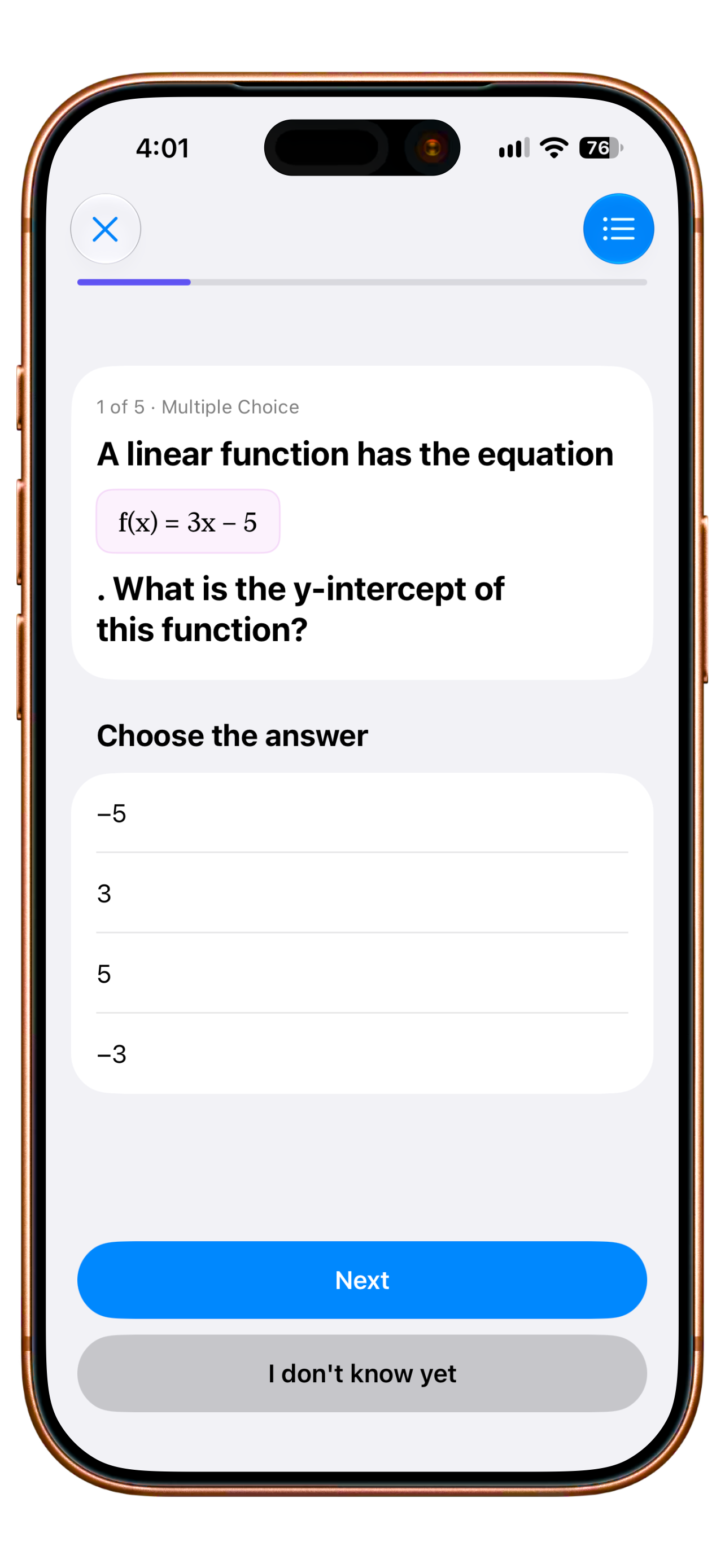
Earlier English Clarity app capture with an example question · undated capture. AI-created editorial photograph.
Study Cards + practice tests
Understand it first.Then make it yours.
A good explanation makes an idea clear. Your own answer shows what stayed with you. In Clarity, Study Cards and practice tests sit alongside your study material.
One topic. Two perspectives.
f(x) = 3x − 5
Where does the line cross the y-axis?
Choose your answer.
One idea at a time.
An explanation, formula and key takeaway give the topic a structure you can return to.
Your own attempt.
A practice question helps you see what you can recall and what you would like to revisit.
Keep learning connected.
Study Cards and practice tests are part of the extended learning flow in Plus. Generated material still needs subject review.
Clarity Teacher · test review
An answer is not yet a grade.
A photo can prepare an answer for review. You decide whether the text is accurate and how many points it earns.
Where does f(x) = 3x − 5 cross the y-axis? Explain your answer.
At −5, because when x = 0 only −5 remains.
Fictional excerpt from a photographed worksheet
 Clarity Teacher
Identify the intercept and explain it using x = 0.
Check the text and choose a score first.
Interactive website demo with fictional answers. It captures no photo and saves no grade. Photo transcription can have technical prerequisites; subject and grade-related decisions stay with the teacher.
All Teacher featuresClarity Teacher · test preparation
Test sheet and answer key.
Prepare a test sheet and its answer key for use on paper. The teacher checks that questions and solutions are correct before exporting a PDF.
 Prepare for the lesson.
Where does f(x) = 3x − 5 cross the y-axis? Explain your answer.
The sheet students will hold.
A clear question and room for their own working. A preview is not delivery to students.
Illustrative print preview with a fictional question. This website creates no test and exports no PDF. AI-created editorial photograph. Generated tests are not delivered directly to students digitally.
A closer look
From practice to reviewable assessment.
Practice tests for learners
Learners can attempt questions connected to their study material for personal preparation. You try an answer and then examine it. The result distinguishes unanswered questions from incorrect ones. Suitable questions can become study cards for further review. Practice can lead into a specific next learning step that remains connected to the material you were working on.
You can identify a more specific part of the material to work on next.
Questions from a topic and source
In the teacher workflow, a topic, source material and selected question types provide the starting point for a test draft. You examine generated questions and solutions, comparing difficulty, content and wording with your teaching. That review shapes the selection for the test. An existing draft gives you something specific to assess.
You have a concrete draft to examine instead of beginning every item on a blank page.
A test and its answer key
Questions and their answer key are prepared as different documents. You can compare each question with its intended answer and points. A stored key provides the foundation for photo marking. If a question arises later, you can return to the actual task and its intended solution to explain your assessment in context.
You keep a traceable foundation for the later review of the responses.
Library, PDF and printing
Prepared tests can be organised in the teacher library by grade, subject and topic. You can find a stored test and create the material as a PDF or for printing. Question sheets and answer keys serve different purposes. Your next lesson can begin with a specific selection you have checked for work on paper.
You can find checked material again and prepare it for a specific lesson.
Check photo responses before marking
Transcription brings text recognised in a photo into a reviewable view. You compare it with the original response and correct reading errors. You then examine rule-based marking and the points that need your own decision. You keep the school’s assessment criteria and the subject interpretation in view before accepting a result.
You can correct a recognition error before it affects your assessment of the work.
Your next step
Give your learning another attempt.
See how Clarity Plus fits your everyday life. Compare what is included and choose your billing period.
- Free
- Not included
- Plus, Family
- Practice tests
- Teacher
- Practice & classroom tests
More about Tests & practice.
Technical details
Technical specification
What is connected. What may act. Where the boundary lies.
Consequence classes describe only actions prepared by Clarity. What you enter or start directly remains your own action.
Updated11 August 2026
- Status
- Plus & Teacher
The plan conditions and boundaries named on this page still apply.
- Relevant sources
- ImportFiles, photo and textAvailable
Manual import paths; no permanently connected third-party account.
- ClarityLearning and test context
Questions, answer keys, photos and subject content within the relevant flow.
- Action & approval
- C1Suggest
A human decides and acts.
Generation, transcription and assessment remain suggestions. A teacher reviews them before a result that affects grades is recorded.
- Stored scope
No separate published quantity exists for practice tests, printouts or scans.
- Plan assignment
- Plus
- Family
- Teacher
- Known boundary
Generated tests are not currently delivered directly to students digitally.
Good to know
- Generated tests are not currently delivered directly to students digitally.
- Vision features may require a teacher-provided key.
- Marking must be reviewed; the grade scale is not currently freely editable.