
Grades
Your grades.In one place.
See your assessments, their history and your weighted average in one place.
Grades in Free · graphs in Plus

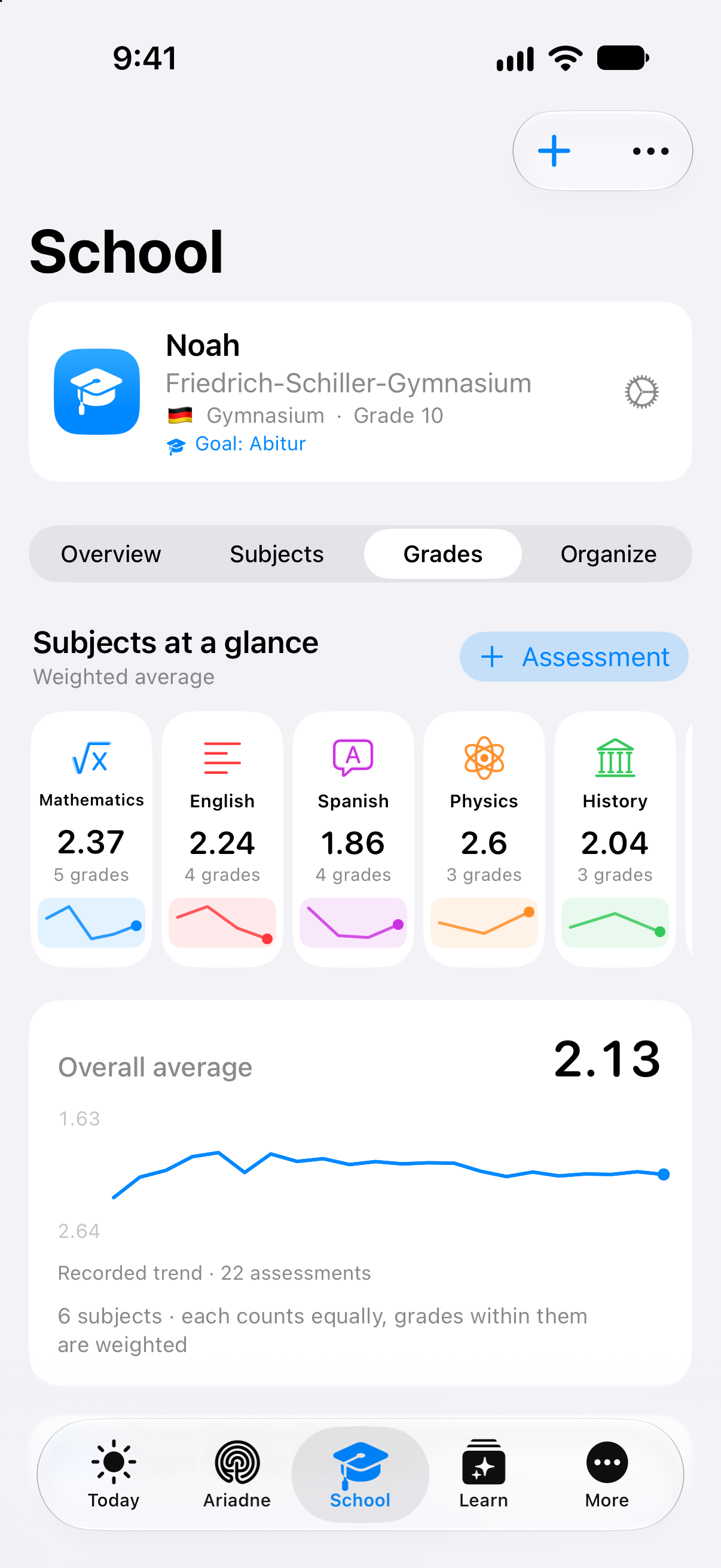
Original Clarity app view from 27 September 2026 with fictional assessments.
Your average. One assessment at a time.
Each recorded assessment updates your average. Choose a subject to see how its assessments contribute.
Choose a point to see the assessment behind it.
Mathematics. Assessment 5: Vectors. Grade 1.30. Weight 1. Weighted average 2.37.
See the assessments and calculation
Category averages at the selected point
- Written
- 1.95
- Oral
- 3.00
1.95 × 60 % + 3.00 × 40 % ≈ 2.37
Category averages are rounded for display. The calculation uses the unrounded values.
| Assessment | Grade | Weight | Category |
|---|---|---|---|
| 2.30 | 2× | Written | |
| 1.70 | 0.5× | Written | |
| 3.00 | 1× | Oral | |
| 2.00 | 2× | Written | |
| 1.30 | 1× | Written |
Fictional app assessments. The line shows the recorded average, not a prediction.
Not every grade counts equally.
Written and oral assessments are averaged separately. Their contributions determine the combined average.
A worked example with two category averages
Individual assessment weights remain within each category. Your school determines the official calculation.
Add an assessment to the example
From the result to the bigger picture
Quick to add.
Clear in context.
Your latest assessment has a place. Alongside your subject, its type and its weight. So the next result becomes part of a picture you can understand.
Try it: change the grade or its weight. Watch what happens to the average.
Interactive website example. The calculation uses the same example marks as the history above, with 60% written and 40% oral assessments.
Your subject, in context
Every grade has an assessment behind it.
A test, a homework assignment, your oral participation: each assessment belongs to its subject in Clarity. Its title, type and individual weight give the number a context you can follow.
Mathematics in the app
- Teacher
- Mr. Weber
- Target grade
- 2.00
A saved target grade gives you a reference for your subject.
Five assessments. One Mathematics subject.
Choose an assessment to see its details.
Assessment 5
Quiz: Vectors
- Type
- Quiz
- Category
- Written
- Individual weight
- 1.0×
These details stay with the assessment. Its type describes the work; its category places it in the written or oral group.
Website example using the five Mathematics assessments from the fictional app data, in recorded assessment order.
Quiz: Vectors. Grade 1.3. Type: Quiz. Category: Written. Individual weight: 1.0.
From pending to recorded
The result comes later. The context stays.
You can record the next Probability test before the result arrives, with its title, date, type and notes. Add the grade to the same entry when it is available.
First choose whether you have the result. The assessment type sets an initial weight; you can adjust its individual weight and oral category yourself.
Interactive website example
A new, fictional Probability assessment extends this example subject. Your entries stay on this page.
Your school system
A scale that fits your school.
The number alone does not tell you how good an assessment is. On the German grading scale, 1 is the highest grade. In the 15-point system, higher numbers mean better assessments.
- 1
- 2
- 3
- 4
- 5
- 6
This Mathematics example uses German grades from 1 to 6. The original app view and the five assessments above belong to that system too.
This choice explains two separate example profiles. It does not convert your assessments. Your school determines the official grading rules.
A lower number means a higher grade. Highest assessment: 1. Lowest assessment: 6.
Fictional everyday example
Understand what makes up your average.
NoahSchool student
Noah receives a mathematics assessment. He wants to understand how it relates to his earlier entries and which weighting his calculation uses. He opens the subject, follows the history and checks the assessments behind the average. He has a more concrete basis for the next question he wants to ask.
A closer look
A number with traceable foundations.
Keep assessments with their subject
A grade entry belongs to a subject and records a value, date, assessment type and individual weight. You compare the details with your feedback and can correct them when necessary. Entries for the same subject stay together in the overview. Later, you can find the occasion behind a number and return to your documents.
You can return to the assessments that make up your personal overview.
Use the relevant grading scale
The calculation follows the recorded school and grading system and its valid range. You check the selected context: a scale from 1 to 6 has a different direction from a system where higher values are better. An appropriate presentation gives the value that context and keeps the grading range readable.
You read a value within the system that gives it meaning.
Two levels of weighting
Individual assessment weights apply within the written and oral groups. The calculation then combines group averages with their recorded shares. At 60 and 40 percent, averages of 2.00 and 3.00 produce exactly 2.40. Intermediate calculations remain unrounded, while the displayed average can be rounded to two decimal places.
You can see why an ordinary average of every visible number may not be appropriate.
History with Plus
With Plus, history shows the recorded average after each assessment. It uses the same shares and individual weights as the subject average and follows the order of the entries. You select a subject and assessment to see their context. The movement of the line can then be related to the results actually recorded.
You can trace a change back to the entries that account for it.
Evidence for a conversation
An average rests on specific assessments and categories. You can compare these with your documents and the school’s rules. For a question, you bring the relevant entry and its weighting into the conversation. The teacher determines the final school assessment; your personal calculation provides a traceable topic to discuss.
You have a concrete basis for questions without expecting an automatically determined final grade.
Your next step
Understand your progress. Plan your next step.
Start with the functions included in Free. Compare the plans when you want to go further.
- Free
- Gradebook
- Plus, Family, Teacher
- With history & insights
More about Grades.
Technical details
Technical specification
What is connected. What may act. Where the boundary lies.
Consequence classes describe only actions prepared by Clarity. What you enter or start directly remains your own action.
Updated11 August 2026
- Status
- Grades in Free · graphs in Plus
The plan conditions and boundaries named on this page still apply.
- Relevant sources
- ClaritySubjects, periods and results
Grades you entered and reviewed results from Teacher workflows.
- Action & approval
- C0Observe
No execution path required.
- C1Suggest
A human decides and acts.
Histories and charts only read. Interpretation and assessment suggestions must be reviewed; the educational decision remains human.
- Stored scope
No separate published quantity limit exists for stored grades.
- Plan assignment
- Free gradebook
- Plus insights
- Family
- Teacher
- Known boundary
Clarity does not replace an educational decision.
Good to know
- Clarity does not replace an educational decision.
- Automatic suggestions must be reviewed.
- No guaranteed performance outcome is promised.