
Clarity Teacher
Your classes.In clear view.
Open your class, see its recorded assessments and prepare your next step — from a test to the lesson log. You make the teaching decisions.
Teacher

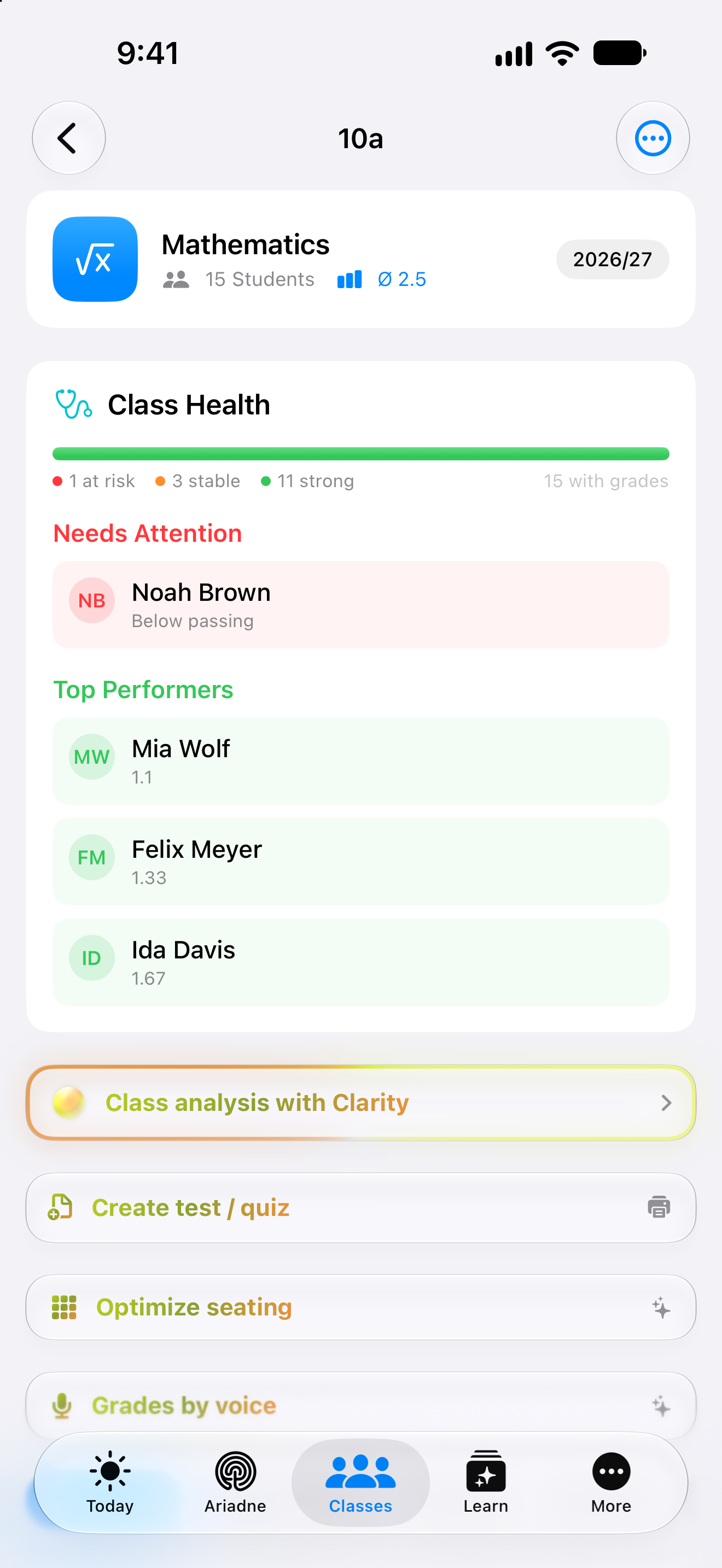
Original Clarity app capture · 25 September 2026. Fictional class and students.
In the classroom
For the little things.
That fill your day.
Who’s here? Who sits where? What comes next? Your class brings the everyday details together, so you can return your attention to the room.
A small action. A complete register.
Mark everyone present, then update the exceptions. Four distinct statuses keep a late arrival separate from an excused absence.
Attendance belongs to the selected date. Return to that day to review or correct a record.
Interactive website illustration · Fictional class and records. The app offers additional students, dates and room sizes.
Grades by voice
Say it. Check it. Save it.
“Mia, two. Felix, one.”
Dictate grades you’ve decided on. With the AI feature enabled, Clarity prepares student matches and values for review. Check the names and scale, add an assignment or reason, then explicitly save. Unclear matches need your attention.
After the test
The suggestion is only a start.
Clarity brings a transcribed answer, criterion and marking suggestion together. The teacher can review and correct each part.
Where does f(x) = 3x − 5 cross the y-axis? Explain your answer.
At −5, because when x = 0 only −5 remains.
Fictional excerpt from a photographed worksheet
 Clarity Teacher
Identify the intercept and explain it using x = 0.
Check the text and choose a score first.
Interactive website demo with fictional answers. It captures no photo and saves no grade. Photo transcription can have technical prerequisites; subject and grade-related decisions stay with the teacher.
All Teacher featuresYour teaching library
Good material.
Ready for the next class.
A place for the work you keep
Use the folder structure that fits your teaching. Saved tests can be moved, printed again or used to create a class assignment.
Cells and their roles
Name: ___________________
- 1.What happens in a chloroplast?
- 2.What does the nucleus contain?
Website illustration. In Clarity, you can print the PDF or export questions and answers separately. Review the content before teaching.
Find your own order. Year group, subject, topic or a custom folder. Your library follows the way you want to find material again.
Keep answers separate. Prepare the student sheet and the answer key as separate PDF exports, then check both before they’re used.
Continue in class context. Choose a class when creating an assignment from a saved test. This is separate from digitally delivering it to students.
Fictional everyday example
More teaching. Less starting over.
MaraTeacher
Before the lesson, Mara opens class 10a, records attendance and returns to her notes on linear functions. The test she checked is in her library. After class, she adds to the lesson log. Her next preparation starts with the work already there.
A closer look
The details between the bigger tasks.
Class lists and assignments
Add students individually or paste a list. The class has separate areas for students, assignments, grades, seating and the lesson log. A grade grid connects marks with the corresponding assignments.
A consistent starting point for everyday work with your class.
Four attendance statuses
Choose the date, then mark each student present, absent, late or excused. “All present” updates the whole list; adjust individual entries afterwards. Return to a day to correct an existing record.
A few actions are enough when almost everyone is there.
Seating and lesson history
Adjust rows and columns to your room and assign empty seats. Students without a place remain visible. The lesson log keeps topics and notes with their session; recorded participation can accompany the entry.
Find both your room arrangement and the lesson you want to return to.
Dictate grades and check the matches
With the AI feature enabled, dictate grades you have decided on. Check recognised names, values and the grade scale. Ambiguous names, existing grades and out-of-scale values are flagged for review. Add an assignment or reason before explicitly saving.
Less typing, with the matching and grading decisions in your hands.
Keep tests ready for another lesson
Organise saved tests by year, subject, topic or your own folders. Export questions and answers as separate PDFs. A saved test can become the starting point for a class assignment; direct digital delivery to students is not currently included.
Good preparation has a lasting place in your library.
Review photographed answers before marking
Photo transcription may require a Vision service key you supply. Compare recognised text with the original and correct it. Then check rule-based points and responses that need your own subject judgement.
Recognition, review and the final grading decision remain distinct, reviewable steps.
Your next step
A more connected view of your teaching.
See how Clarity Teacher fits your everyday life. Compare what is included and choose your billing period.
- Free, Plus, Family
- Not included
- Teacher
- Included
For an agreed school rollout, explore Clarity School ↗
More about Teacher.
Technical details
Technical specification
What is connected. What may act. Where the boundary lies.
Consequence classes describe only actions prepared by Clarity. What you enter or start directly remains your own action.
Updated11 August 2026
- Status
- Teacher
The plan conditions and boundaries named on this page still apply.
- Relevant sources
- ImportFiles, photo and textAvailable
Manual import paths; no permanently connected third-party account.
- ImportICS and WebUntisAvailable
A calendar feed or manual school-calendar and timetable paths.
- ClarityTeaching context
Classes, attendance, assignments, tests, answer keys and reviewed results.
- Action & approval
- C0Observe
No execution path required.
- C1Suggest
A human decides and acts.
Class views and insights read. Generated tests, transcriptions and assessment steps remain suggestions under the teacher's responsibility.
- Stored scope
Teacher is described for one teacher. School requires a school agreement and data-protection approval before live use.
- Teacher100 GB1 teacher · Server-confirmed allowance for the plan.
- Plan assignment
- Teacher
- Known boundary
Generated tests are not digitally delivered to students in the current version.
Good to know
- Generated tests are not digitally delivered to students in the current version.
- Teacher Lock is not active by default.
- School still requires a school agreement and DPA approval before live use.