
Clarity Health
A moment for yourself.A view of your day.
See your steps in context, explore recorded sleep and give your own observations a place. One view for the things that shape your day.
Your day.
With its own context.
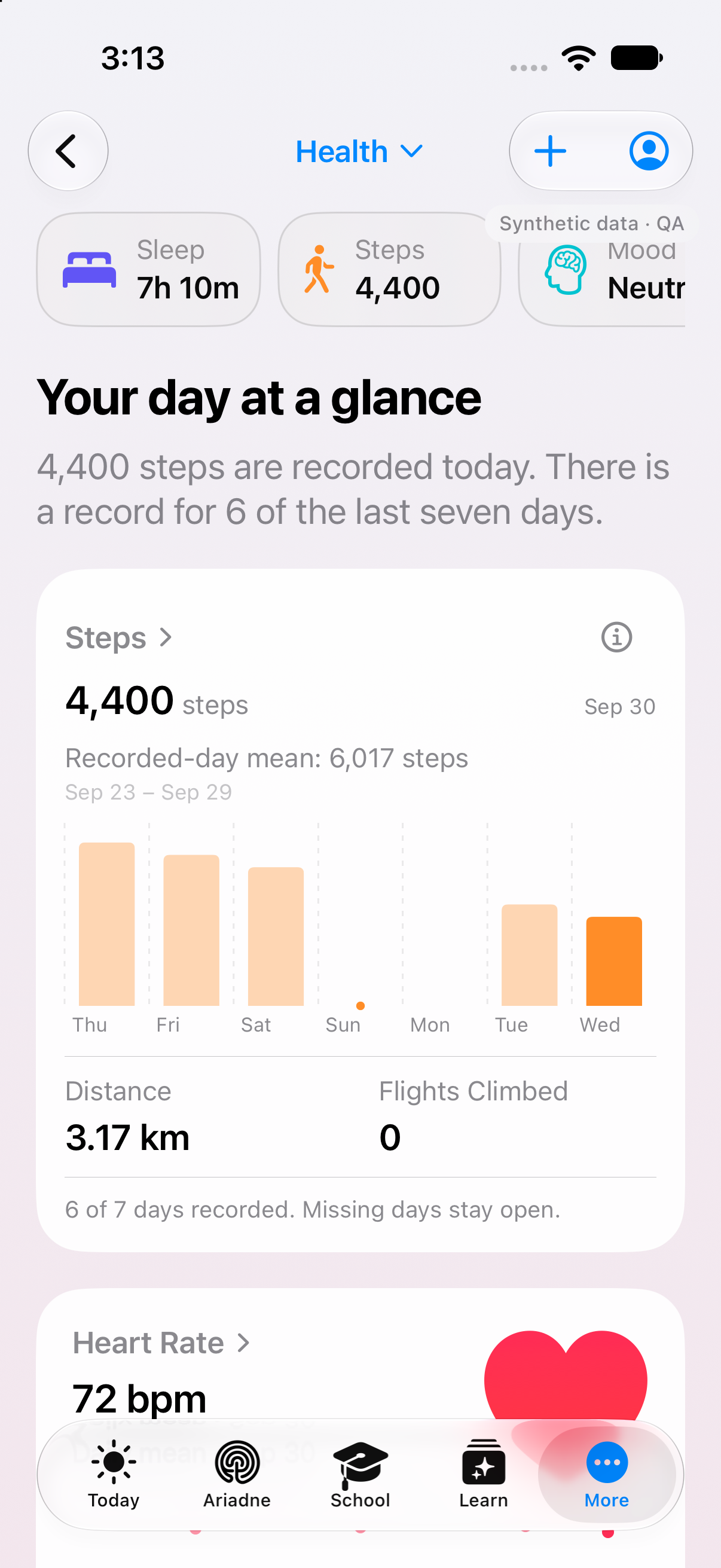
Mood.
Water.
Activity.
Original Clarity app · example data, 30 September
Personal area in the appTry a check-in
- Feeling
- Words
- Your choice
How have you felt overall today?
There is no right or wrong answer.
Neutral
Seven choices from very unpleasant to very pleasant.
Feeling. Neutral. Daily mood.
Clarity Health · sleep
The night.Over time.
See when each sleep stage was recorded. Choose a stage to view its duration and the matching intervals.
Fictional example night
23:15–06:55
Use the arrow keys to move between stages. Home and End choose the first or last view.
Time asleep: 7 h 30 min. 10 min awake.
Which stage, when?
Each interval sits at its recorded time. Its width matches its duration.
Clarity shows sleep data when readable recordings are available from Apple Health. Missing stages and intervals remain unknown.
View every interval
| Stage | Start | End | Duration |
|---|---|---|---|
| Core sleep | 23:15 | 23:35 | 20 min |
| Deep sleep | 23:35 | 00:15 | 40 min |
| Core sleep | 00:15 | 01:00 | 45 min |
| REM sleep | 01:00 | 01:20 | 20 min |
| Awake | 01:20 | 01:25 | 5 min |
| Deep sleep | 01:25 | 02:05 | 40 min |
| Core sleep | 02:05 | 03:05 | 1 h |
| REM sleep | 03:05 | 03:35 | 30 min |
| Core sleep | 03:35 | 04:25 | 50 min |
| Awake | 04:25 | 04:30 | 5 min |
| Deep sleep | 04:30 | 04:40 | 10 min |
| Core sleep | 04:40 | 05:25 | 45 min |
| REM sleep | 05:25 | 06:20 | 55 min |
| Core sleep | 06:20 | 06:55 | 35 min |
Interactive website example with fictional values. No data is saved or loaded from Apple Health. This view does not assess sleep quality or health.
Clarity Health · your history
Your moments.Your history.
A check-in, a glass of water, a walk: see the moments you recorded together. A day without an entry remains unknown.
Example week 6 entries
Mood / 7 days
Display range: bottom Very unpleasant top Very pleasant
How you described this moment.
Source: entered by youThe values behind this view
Each day has one self-entered example value. The line connects existing entries. Wednesday has no entry, so the history stays open there. There is no daily target or assessment of your health.
| Day | Example value |
|---|---|
| Mon | Neutral |
| Tue | Slightly pleasant |
| Wed | No entry |
| Thu | Slightly unpleasant |
| Fri | Slightly pleasant |
| Sat | Pleasant |
| Sun | Slightly pleasant |
Your personal space
Just for you.
Health entries do not automatically appear in Family Hub or school monitoring.
Understand HealthInteractive example values. No data is saved or loaded from Apple Health; this view is not a medical assessment.
A closer look
Put personal entries and available data in context
Deliberately record a mood
Mood entry offers seven valences and separates a moment from an overall daily feeling. Optional feelings and areas of life can describe your answer more precisely; extra words are not required. The choice remains your own assessment. It is not inferred from sleep or activity and is not a medical value judging your day or health.
Record how you experienced a moment or day yourself.
Enter water yourself
The water view shows the amount entered in millilitres for the day. Deliberately add water through the offered increment and edit your own target separately. A target and its ring express your chosen reference, rather than a general drinking recommendation. The display relies on your actually saved values and does not replace a device recording.
See the amount you recorded and which day it belongs to.
Enter a personal activity
For your own activity, choose a type, describe it and enter duration, date and time. These details are separate from steps automatically read through a device source. A walk entered as a personal activity therefore claims neither a measured step count nor a complete record of every movement throughout that day or time period.
Document a particular activity even when there is no corresponding device recording.
Read an available sleep recording
Sleep views distinguish duration, start and end, and available stages. A timeline requires recorded intervals; missing sections are not invented. Source and time zone help explain the record. The website does not currently list Apple Health as an approved connection; its labelled example night is neither your account's connected recording nor a sleep assessment.
Understand an available recording or a clearly labelled example without confusing duration with the time window.
Consider period, source and gaps
A history is only as complete as the data available for its period. A missing value is not a measured zero. If a device source is offered, you initiate its separate system request; a completed request does not guarantee all data. Health entries do not automatically become Family content or allowed personal context for Ariadne.
Put the displayed history in context and decide personal data permissions separately.
Your next step
Time to get to know yourself better.
Start with the functions included in Free. Compare the plans when you want to go further.
- Free, Plus, Family, Teacher
- Included
More about Health.
Technical details
Technical specification
What is connected. What may act. Where the boundary lies.
Consequence classes describe only actions prepared by Clarity. What you enter or start directly remains your own action.
Updated27 September 2026
- Status
- Personal area in the app
The plan conditions and boundaries named on this page still apply.
- Relevant sources
- ClarityPersonal Health entries
Self-entered mood, water, activity and goals in your personal area.
- Not approved as a connectorApple HealthNot yet approved
The current registry state is not ready for marketing.
- Action & approval
- C0Observe
No execution path required.
Views read existing data. You trigger entries and device permissions separately yourself.
- Stored scope
The signed HealthKit path has not yet been verified end to end; raw data is not presented as Family content.
- Plan assignment
- Free
- Plus
- Family
- Teacher
- Known boundary
Health data does not automatically appear in Family or the school monitor.
Good to know
- Health data does not automatically appear in Family or the school monitor.
- A device source can only be used where it is offered. It needs your permission and available data.
- Clarity Health does not diagnose or replace medical care.