
Clarity Calendar
Your day.With room for you.
Your appointments and the sources you choose. Together in Calendar.
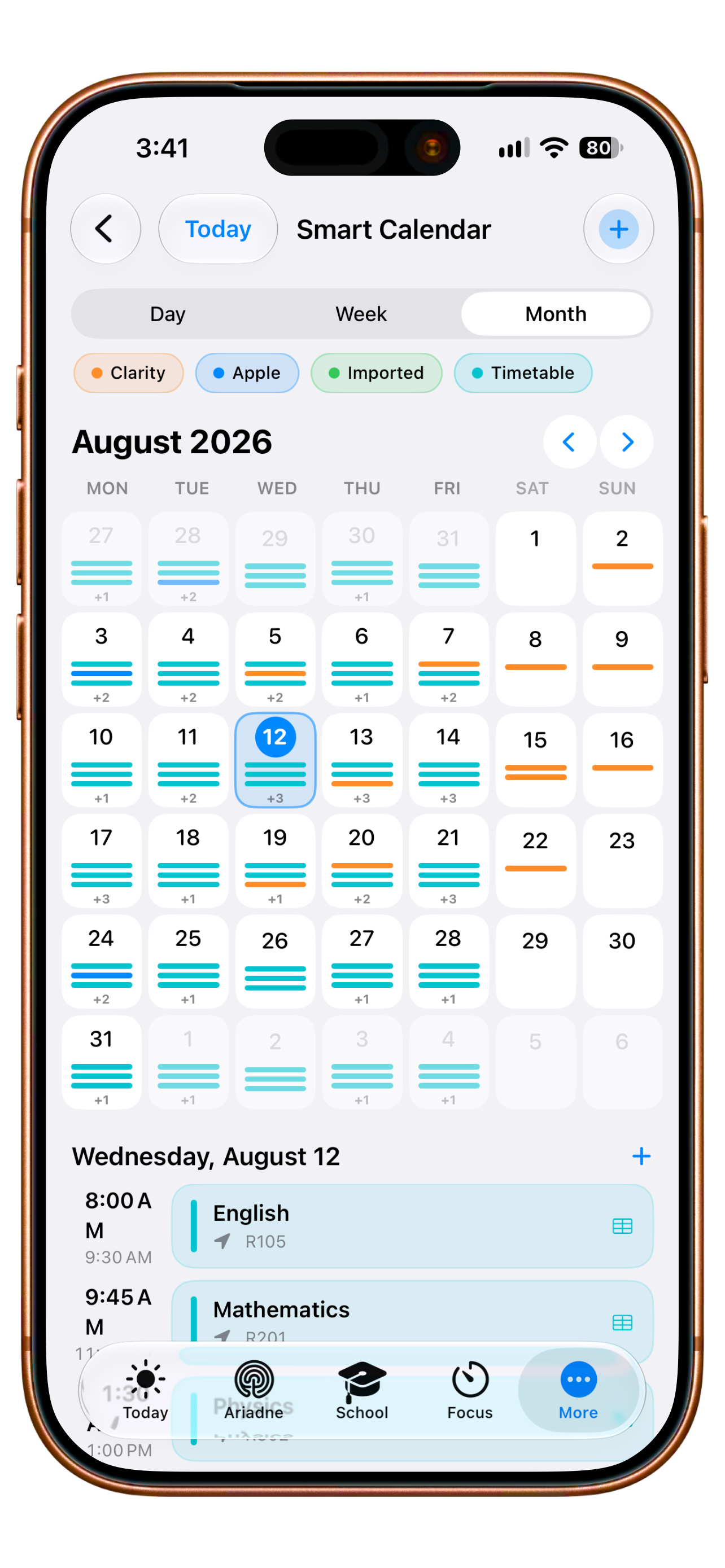
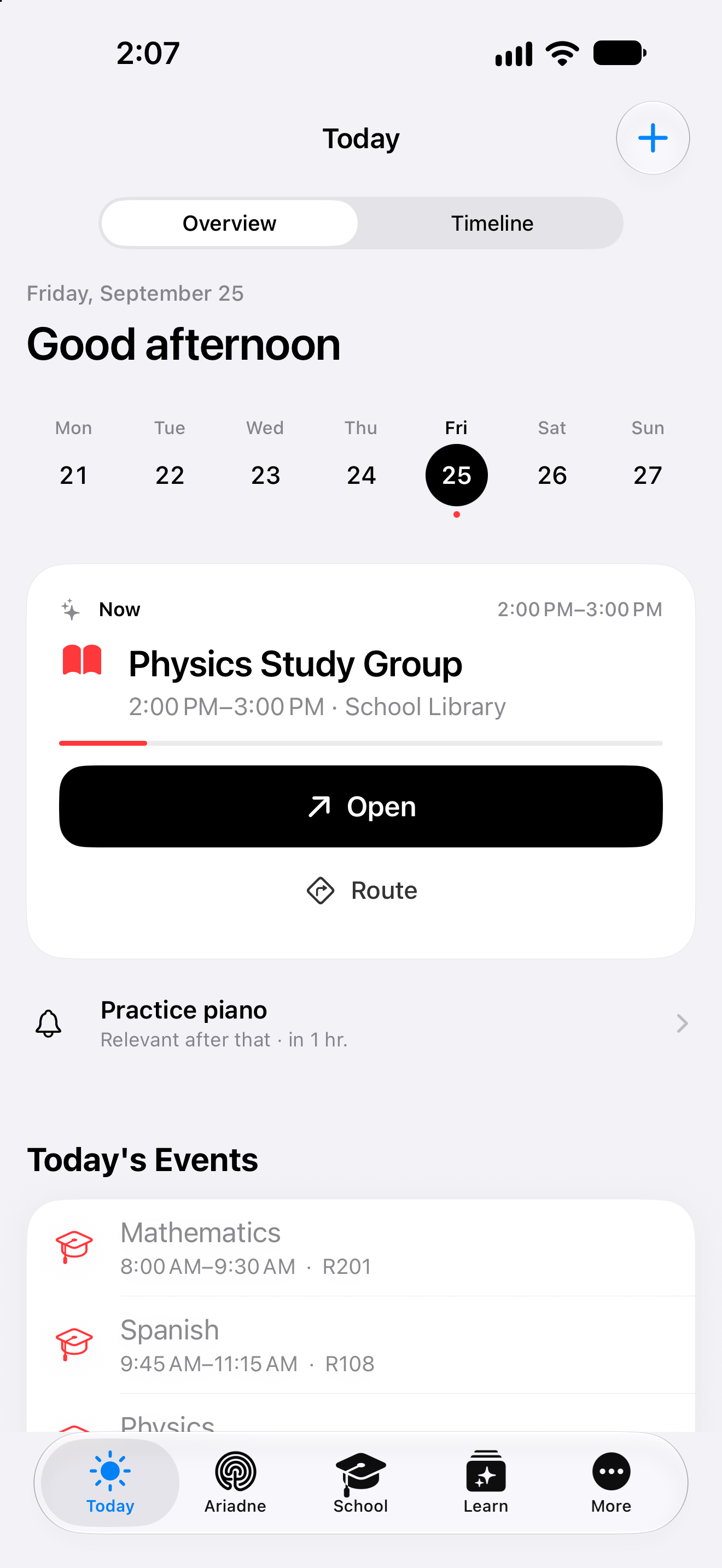
Original views with example data. Calendar: earlier English, undated capture. Today: 25 September 2026.
AvailableCreating an appointment
It starts with
what you have in mind.
Describe the arrangement. Let recognition separate the details. Then make the choices that belong to you.
Prepared website example · recognition uses sample data; your choices stay in this demo.
- 01Describe
- 02Review
- 03Your choice
From the plus button in Calendar
In Clarity, the description goes into the title field. With AI access available, you explicitly choose “Detect with AI” to fill a draft.
The timing. The place. Your choices.
Review the populated fields and adjust them. Repetition and an alert are separate options you choose yourself.
Appointment draft
Room for the details.
A plan you can put into practice
See the bigger picture.Start with what is next.
From a month of plans to the moment you head out. Explore the views that make your plan useful in everyday life.
Day · Week · Month
Your week is partof a bigger picture.
The month view shows which days already have plans. Choose a day to see its events. Switch to the day or week view when you want to look more closely.
August 12 is selected in this example. Coloured entries show which sources the events belong to.
Your plan. Your choice.
Keep the context.Recognise every source.
Your entries, authorised Apple calendars, imported events and timetable stay distinguishable. Choose which sources appear in your calendar.
Hiding a source only changes the view. Calendar import and synchronisation require Plus and the relevant permission.
Today · At the right moment
Know what is next.And get going.
Today gives your next event room to breathe. The physics study group has its time and place right on the card. Open the event or get a route from there.
Calendar gives you the overview. Today brings you back to the events and tasks of the current day.
- Choose your sources
- See your calendar
- Continue in Today
Choose a view to enlarge details from the app captures. Your calendars and events are not changed.
Calendar + timetable
Many plans.One clear picture.
Lessons, your own appointments and a free afternoon all belong to the same day. Clarity brings them together, with identifiable sources you can show or hide individually.
A Wednesday in your life
4 events shown
Hide a source. The day stays the same.
Keep the context.
An appointment has a time. A lesson has a room. Together, they make a day you can plan around.
Choose your sources.
Apple Calendar connects with your permission. Hiding a calendar does not delete it or disconnect it.
From the week to right now.
Calendar gives you an overview. Today brings you back to the events and tasks of the current day.
A closer look
The time you see. The sources behind it.
The examples follow Mina, a fictional university student, through an everyday situation.
Draft an event from a description
The Plus button opens the event editor on the selected date. Mina can fill the fields herself or describe the arrangement and use recognition when AI access is available. She reviews time, location and people in the draft, then chooses repetition and an alert herself. A resolved location can add map context and current weather when enabled. The checkmark saves her reviewed entry.
Give a new arrangement its details where you plan its time.
Day, month and an eligible week view
The month view helps Mina find her way through and between weeks. A selected day has an agenda and its own time view. The week view is also available with the appropriate access. She can read the same saved plan at different distances: first see where something belongs, then inspect its timing and details.
Read the same plan at a distance and in detail.
Choose the visible sources
Clarity events, Apple calendars, imported entries and the timetable can be identified and shown as separate sources. Mina can narrow a question to one source before returning to the full picture. Hiding an entry does not delete it. Apple Calendar also requires system permission and selection of the calendars that should belong in this view.
Know which parts of your week are currently being shown.
Import a published school calendar
Mina can bring a published ICS file into Calendar through its import route; Untis has a separate route. Availability follows her plan access. After import, she checks the information against its source and can read the entries alongside personal appointments. For a university event, its date and origin therefore remain together within the same planning context.
Published dates can have a place in the same planning context.
Bring lessons into everyday planning
Active timetable lessons appear alongside personal events. A timetable photograph can make setup easier through its own import flow: Mina reviews the recognised subjects and times and chooses what to bring in. The saved school plan then belongs in Calendar. When life outside class adds another commitment, lessons remain part of the same week.
Your timetable remains part of the week when life outside class adds something.
Your next step
Your time. In one connected view.
Start with the functions included in Free. Compare the plans when you want to go further.
- Free
- Core calendar
- Plus, Family, Teacher
- With import & sync
More about Calendar.
Technical details
Technical specification
What is connected. What may act. Where the boundary lies.
Consequence classes describe only actions prepared by Clarity. What you enter or start directly remains your own action.
Updated11 August 2026
- Status
- Available
The plan conditions and boundaries named on this page still apply.
- Relevant sources
- NativeApple CalendarAvailable
Explicit system permission; events connect through Apple's calendar framework.
- NativeApple RemindersAvailable
Explicit system permission; a functional path for system reminders.
- ImportICS and WebUntisAvailable
A calendar feed or manual school-calendar and timetable paths.
- Private PreviewMicrosoft OutlookPreview
OAuth configuration and security review remain outstanding.
- ClarityClarity Calendar
Your own appointments, exams and deadlines.
- Action & approval
- C0Observe
No execution path required.
- C2After your approval
Preview and explicit approval before execution.
Reading authorised calendars is C0. A real change prepared by Clarity is C2 and requires a preview and explicit approval.
- Stored scope
No separate published quantity meter exists for events.
- Free core calendar
- Plus import & sync
- Plan assignment
- Free core calendar
- Plus import & sync
- Family
- Teacher
- Known boundary
Clarity deliberately does not offer Gmail at present.
Good to know
- Clarity deliberately does not offer Gmail at present.
- Outlook remains a private preview without a configured client ID.
- Every native source follows its own system permission.