
Clarity Space
Your content.Its place in Clarity.
See your account’s confirmed cloud use. Keep what you have saved within reach, even when capacity is full.
Available in Account
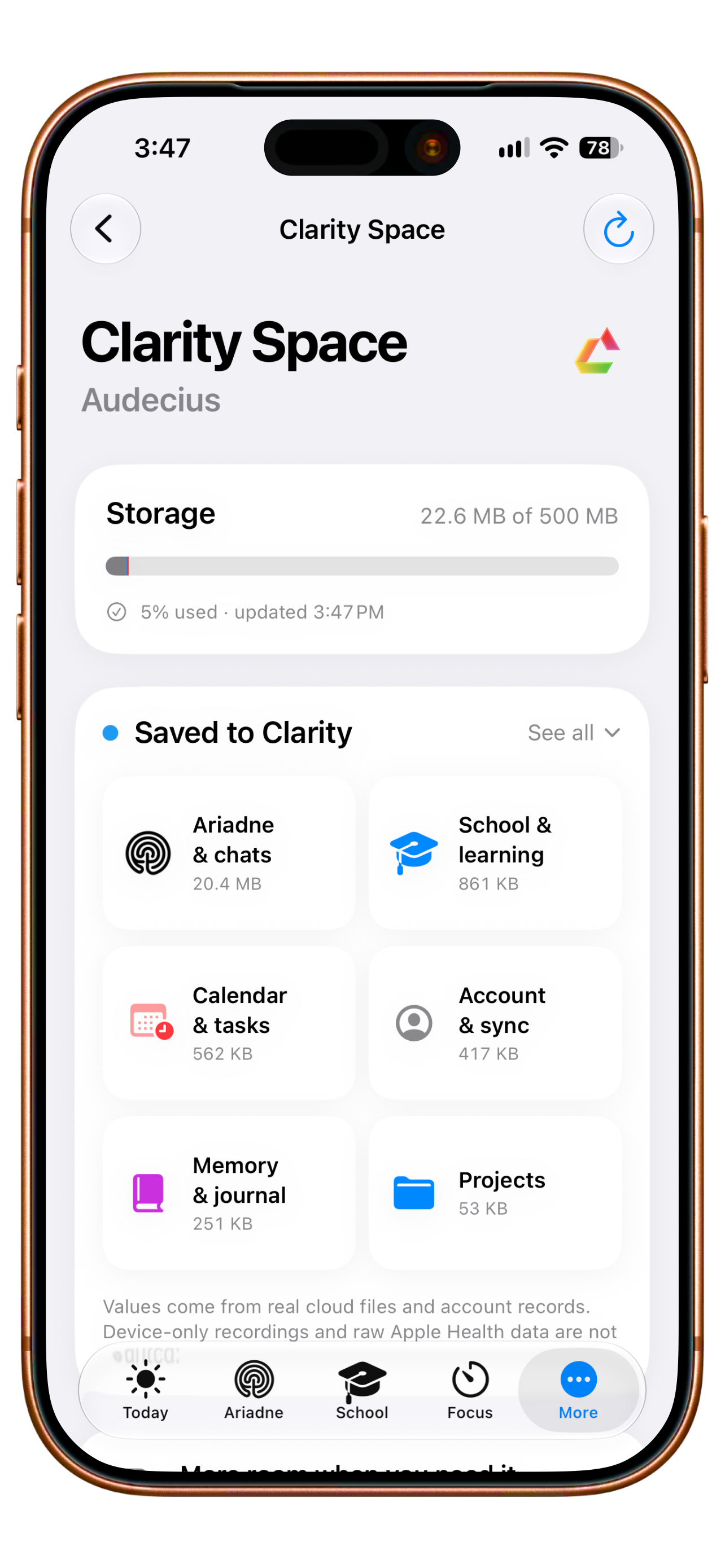
Your content stays within reach.
New cloud writes pause. Saved content stays readable; available export and deletion paths remain accessible — including after a plan change.
Earlier English app capture. The storage values belong to the capture; no access to your account.
Clarity Space
Know what is there.
See where it belongs.
Your notes, learning and conversations share one account. Explore where the space in this example goes — and how much remains.
Example account · six categories
Used in this example
22.6 MB
Choose a category to see what the number contains.
A closer look
Understand your own storage status
See confirmed usage and capacity
Space reads the account's confirmed storage status and shows used and total capacity together. It is not a local estimate based on this device's files. Without confirmed data, usage remains unknown; loading and error states are visible. The number is therefore tied to an actual account value before you use it to make a decision.
Assess your cloud capacity from the account status shown rather than a guess.
Understand usage by area
The category overview relates saved content to Clarity areas, such as Ariadne and chats, school, calendar and tasks, Memory and journal, and projects. The proportional bar shows their share of confirmed capacity. When more categories are available, expand the overview to see those areas as well, together with their respective amounts of saved content.
See which part of your Clarity life occupies the storage being measured.
Check when the measurement was updated
Space shows an update time with the confirmed status. If a request fails or no value has loaded, it displays that state. An older confirmed value can therefore be distinguished from missing confirmation now. Check the status again without treating a loading error as either available capacity or a genuinely measured zero.
Judge how current the number is before planning another upload.
Open your plan in the storage context
Space shows the current plan and confirmed capacity of your account. Open the plan route to compare options or manage an existing subscription through the App Store. Questions about billing, restore and storage size lead to the relevant support area. Usage, your plan and help are therefore reachable from the same storage area.
Compare your actual need for space with the plan available to you.
Understand the full-capacity boundary
When cloud capacity is exhausted, new cloud saves pause. Existing content remains readable, with its available export and deletion routes still accessible. Open what you already have and consider your next storage need. Device-only recordings and raw Apple Health data sit outside this measurement; Space describes the extent of your saved cloud content.
Choosing more storage concerns new cloud content while existing content stays accessible.
Your next step
Your content has its place.
Start with the functions included in Free. Compare the plans when you want to go further.
- Free
- 500 MB
- Plus
- 10 GB
- Family
- 500 GB Clarity Space*
- Teacher
- 100 GB
* Family shows the plan’s storage allowance. The current web counter measures each account; shared web storage is not available yet.
More about Space.
Technical details
Technical specification
What is connected. What may act. Where the boundary lies.
Consequence classes describe only actions prepared by Clarity. What you enter or start directly remains your own action.
Updated11 August 2026
- Status
- Available in Account
The plan conditions and boundaries named on this page still apply.
- Relevant sources
- ServerAccount LedgerAvailable
Confirmed usage, categories and plan limit instead of a local estimate.
- Action & approval
- C0Observe
No execution path required.
The meter reads confirmed values. Upload, export and deletion remain your actions; when Space is full, only new cloud writes are blocked.
- Stored scope
On-device recordings and raw Apple Health data do not count as cloud use.
- Free500 MB1 person · Server-confirmed allowance for the plan.
- Plus10 GB1 person · Server-confirmed allowance for the plan.
- Family500 GB Clarity Space*Up to 5 people · The current web meter measures per person. A shared household pool is not yet a published product contract.
- Teacher100 GB1 teacher · Server-confirmed allowance for the plan.
- Plan assignment
- Free 500 MB
- Plus 10 GB
- Teacher 100 GB
- Family 500 GB
- Known boundary
On-device recordings do not count as cloud usage.
Good to know
- On-device recordings do not count as cloud usage.
- Raw Apple Health data is excluded.
- The web shows only confirmed server values after sign-in.