Ariadne 3.0 and Intelligent UI for everyone who learns
Ariadne 3.0 is the model behind Clarity, a personal tutor that knows how you learn. Today we’re showing how Ariadne will answer your questions in the future, using more than text.
Ariadne 3.0 brings Intelligent UI to Clarity. For each question, Ariadne can build an interface that fits the answer. That might be a diagram you can move, a quiz, a plan you can tick off or a small study tool. What it builds depends on what you already know, what helps an idea click and what’s coming up for you.
What are the parts of a microscope?
The light microscope
A light microscope magnifies the image in two stages, first with the objective lens, then with the eyepiece. Light comes from below and passes through the specimen on the stage.
From top to bottom: eyepiece, tube, objective lenses, stage, diaphragm and lamp.
Introducing Intelligent UI
Ariadne 3.0 combines text, diagrams it draws and elements you can interact with. Each question calls for a different mix. With Intelligent UI, an answer can include diagrams, sliders, quizzes, flashcards, plans and small study tools you can use right in the conversation.
The format depends on what you ask and what you need. If a topic is new to you, a picture can be a good place to start. If you have a test tomorrow, a short quiz might be more useful. Ask about the same step for a third time and you’ll see a hint with the example that helped you last time. Sometimes all it takes is a sentence. That’s what you’ll get.
Clearer answers for the school day
Ariadne can make a plan easier to follow by showing how the pieces fit together. Your maths revision plan uses the minutes you have and leaves your practice day free. An outline for a presentation shows how long to spend on each part. Eleven new words become small sets you can learn by Friday.
Chat without Intelligent UI
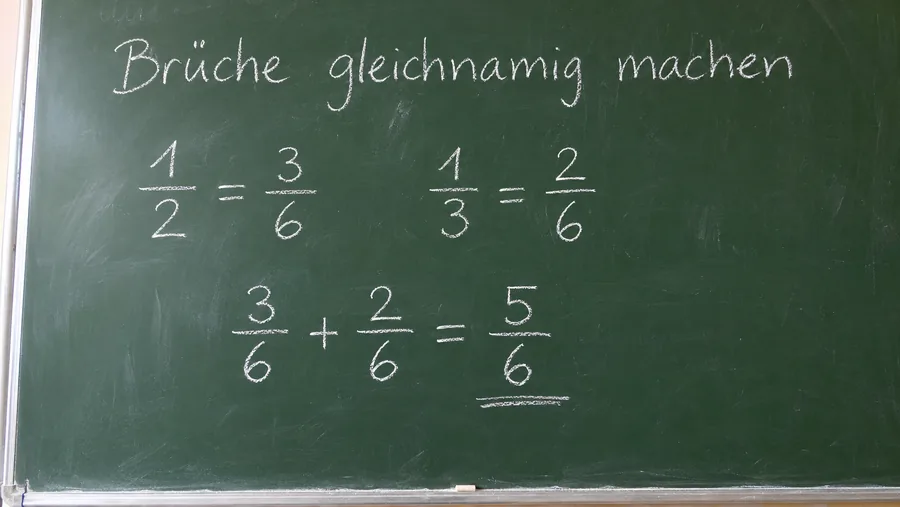
I’ve got a maths test on fractions on Friday. This was on the board today. Can you make me a study plan? I’ve got training on Tuesday.
Sure! The example on the board shows how to find a common denominator for fractions. There are four days until Friday. Since Tuesday is taken, I’ll spread the work over Monday, Wednesday and Thursday.
What you need to know
- Finding equivalent fractions and simplifying them
- Adding fractions with the same denominator
- Adding fractions with different denominators
- Mixed numbers
Your plan
| Day | Topic | Duration |
|---|---|---|
| Monday | Equivalent fractions, simplification and matching denominators | 25 min |
| Tuesday | Day off (training) | – |
| Wednesday | Different denominators | 30 min |
| Thursday | Mixed numbers and a practice test | 25 min |
If you have extra time on Wednesday, try some word problems too. If you have less time, I’d spend less time on mixed numbers.
How to get started
On Monday, start by practising equivalent fractions: multiply the numerator and denominator by the same number. Then practise simplifying: divide both by the same number. Try five questions for each step.
Wednesday is the key session. First find a common denominator, rewrite both fractions using it and then add the numerators. The denominator stays the same.
On Thursday, take a practice test without help. Afterwards, review just the questions you got wrong.
Tips
- Try three short sessions instead of one long one.
- Write down each intermediate step.
- Get an early night before the test.
Shall I make some exercises, shorten the plan or put together a practice test?
Ariadne 3.0 with Intelligent UI
I’ve got a maths test on fractions on Friday. This was on the board today. Can you make me a study plan? I’ve got training on Tuesday.
Your plan up to Friday
Today’s board covered finding a common denominator. That’s the step you’re still working on. You’re already comfortable adding fractions when the denominators match, so we’ll spend most of your time on the part you find tricky.
You have practice on Tuesday. I’ll leave that day free.
Maths test: fractions
- GoalAdd fractions with different denominators confidently
- TimeThree study days, Tuesday off
- Starting pointStart with the playing-field diagram that helped you last time
- TestFriday, second period
1. What’s on the test
- Finding equivalent fractions and simplifying them confidentYou know four of the five flashcards. A quick check will do.
- Matching denominators confidentYou solved this without a hint last week.
- Finding a common denominator needs practiceThe step from today’s board. You asked about it three times.
- Mixed numbers NewWe’ll add this on Thursday, with a picture.
2. How much time do you have?
Set how many minutes you can fit in each day. The plan updates as you go.
- Monday: quick check and like denominators
- Tuesday: practicefree
- Wednesday: unlike denominators
- Thursday: mixed numbers and practice test
- Total
Wednesday gets five more minutes because that’s when you’ll tackle the trickiest step.
3. From now until Friday
Tick off what you’ve done. On Thursday, try a practice test without hints.
An exercise shows you what to work on next. It doesn’t count towards a grade.
Three tips for the week
- Start with the playing-field diagram on Wednesday. The rule comes afterwards.
- On Thursday, explain one step back to me in your own words.
- If you get stuck on Wednesday, give me a quick call. I’ll draw along with you.
Chat without Intelligent UI
I have to give a five-minute talk about volcanoes next week. Can you help me structure it?
Sure! For five minutes, you need a clear structure with an opening, a main section and a conclusion.
Outline
- Opening (30 seconds): a question or picture that sparks curiosity
- Parts of a volcano (1:30): magma chamber, vent, crater
- The eruption (1:30): pressure, gases, lava and ash
- An example (1:00): Vesuvius and Pompeii
- Conclusion (30 seconds): the main point in one sentence
Timing
| Section | Duration | Slide |
|---|---|---|
| Opening | 0:30 | 1 |
| Structure | 1:30 | 2 |
| Eruption | 1:30 | 3 |
| Example | 1:00 | 4 |
| Conclusion | 0:30 | 5 |
Presentation tips
- Put key words on your cards instead of writing out the whole talk.
- Practise aloud at least twice with a stopwatch.
- Point to your drawing as you explain.
Would you like me to write your cue cards or think of questions your classmates might ask?
Ariadne 3.0 with Intelligent UI
I have to give a five-minute talk about volcanoes next week. Can you help me structure it?
Your presentation: volcanoes
Five minutes go quickly. Let’s give your talk a thread to follow in five parts. Tap a part to see what goes in it.
- Slide
- Key takeaway
Your drawing
Before the presentation
Chat without Intelligent UI
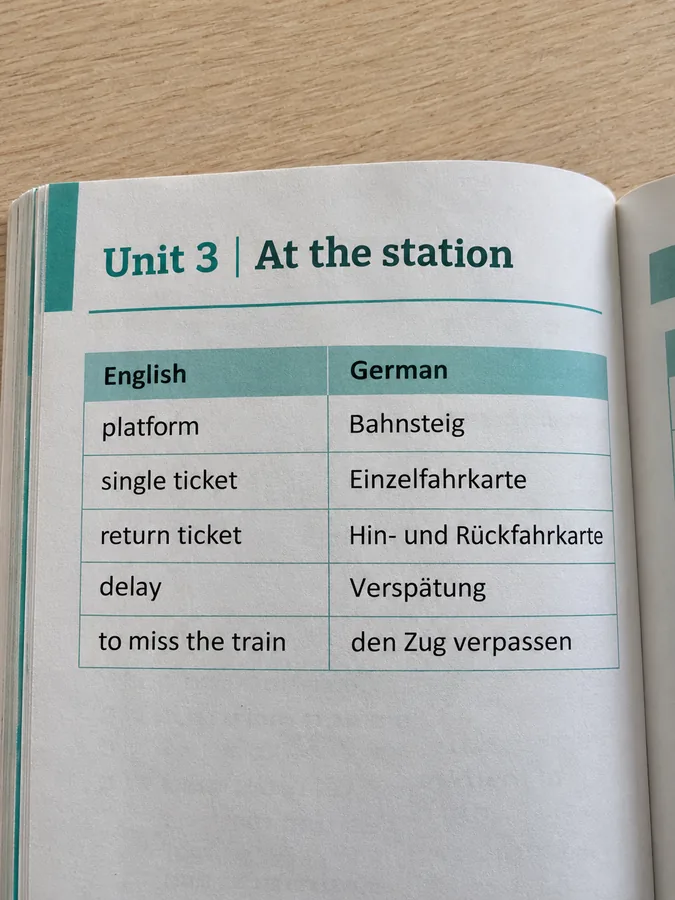
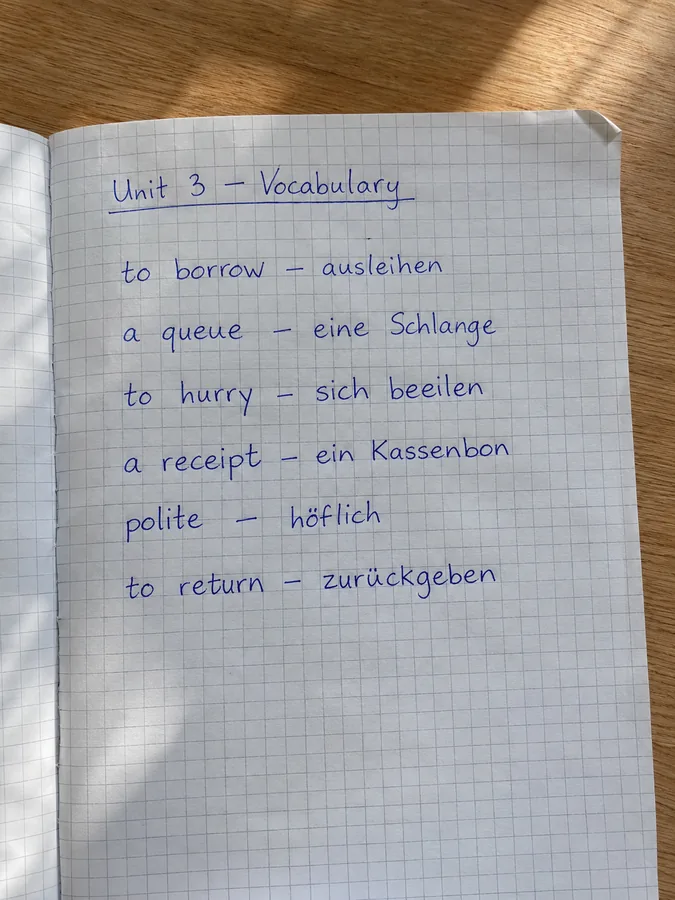
I need to know Unit 3 by Friday, including this page from the book and the list in my notebook. How can I get through it all?
That makes eleven words: five from the book and six from your notebook. You can learn them if you break them into small sets and review a few each day.
Your plan
| Day | New | Review |
|---|---|---|
| Monday | 4 words | – |
| Tuesday | 4 words | Monday |
| Wednesday | 3 words | Monday, Tuesday |
| Thursday | – | all 11 |
How to practise
- Cover the German side and say the word out loud.
- Write tricky words three times.
- Make a short sentence with each new word.
- Review them for another five minutes in the evening.
Write down any words you’re still unsure about on Thursday and look at them again on Friday morning.
Would you like me to quiz you? Send me your list.
Ariadne 3.0 with Intelligent UI
I need to know Unit 3 by Friday, including this page from the book and the list in my notebook. How can I get through it all?
Eleven words by Friday
I’ve read both photos: five words from the book and six from your notebook. “To return” and “return ticket” go together. You’ll learn them on the same day.
1. Small sets
2. Try a word now
to borrow
3. On Thursday
I’ll quiz you on all eleven words in a mixed order and in both directions. On Friday morning, your phone will give you a short round with the ones you’re still unsure of.
Interactive illustrations of the planned learning experience, using sample data. These are not live answers from Ariadne.
Making difficult ideas easier to understand
Some things make sense once you can move them yourself. With an interactive explanation, you can try something, change a value and see what happens. Then it’s your turn.
These scenes illustrate the planned learning experience using sample data. They are not recordings of live answers.
Build your own study tools just by asking
You can also ask Ariadne to make a tool for the task in front of you. Turn a photo of your notebook into a vocabulary trainer, find out what mark you need on your next test or practise your times tables with a small game.
Turn this into a vocabulary trainer that looks like paper flashcards.
Tap the card to turn it over.
Make me a calculator. What mark do I need on my next maths test to reach my target grade?
Grade calculator · Maths, four tests
Make me a small mental maths game that looks like an old arcade game.
7 × 8
20 SECONDS. HOW MANY CAN YOU GET?
How Intelligent UI works
With Intelligent UI, Ariadne 3.0 can build the interface that best answers each question. It can go beyond existing templates.
Ariadne builds the interface itself. An answer might be a diagram drawn from scratch, a set of sliders or a small tool for the problem you’re working on. Each one follows the same design principles, with consistent type and controls and the quiet feel of Clarity.
What Ariadne builds also depends on your learning profile. It takes into account what you already know, which explanation helped last time, where you asked a follow-up question and what’s coming next. Two children in the same class can get different answers to the same question. And what you see the night before a test can differ from what you see on a free afternoon.
Every interface follows one rule: you try first, then see the full solution. If you make a mistake in a quiz, you get a hint. A diagram ends with a question for you. At the end there’s a new problem to tackle by yourself.
There’s more work to do. We want Ariadne to get better at telling when a diagram will help and when a sentence is enough. Even now, Intelligent UI is changing how it feels to learn with Clarity: you spend less time reading and more time trying things out.
Personal help, sooner
In our internal tests, Ariadne 3.0 offered a useful first step sooner.
Baseline
Ariadne 3.0
Both films play back two measured averages in real time: the first substantive response to a student’s photo (300 photo requests per version), and the first exercise ready to use (200 interactive tasks per version). The examples are illustrative.
Speed matters only if the answer is useful. We rated the answer visible at three points in time. At four seconds, Ariadne 3.0 scored 52 out of 100 and the baseline scored 29. At eight seconds, Ariadne 3.0 scored 81, already higher than the baseline’s score at twenty seconds.
For questions that needed a web search, Ariadne 3.0 delivered its first substantive response 45.5% sooner on average. For questions about a student’s photo, it was 45.6% sooner.
On difficult problems, Ariadne 3.0 more often identified what was getting in the learner’s way and chose a suitable format: text, flashcards or a hands-on exercise. In the user test, more students went on to solve a similar new problem independently.
The biggest difference appeared when someone returned. Ariadne 3.0 more often picked up correctly on an earlier misconception and reused an explanation that had worked before for a new task.
It also made fewer repeated mistakes. Ariadne 3.0 was less likely to go back to an explanation that had already failed or bring up a memory that was no longer relevant.
All figures come from internal Audecius tests. Sample sizes are per version. There has not yet been an independent study of Clarity’s impact on grades or learning outcomes.
Intelligent UI safety for young people
An interface for children and teenagers needs clear boundaries. We’ve planned these rules for Ariadne 3.0 and for everything Intelligent UI shows.
- First you try, then you see the full solution.
- You can see what Ariadne remembers about your learning and change or remove it.
- Your child decides what parents can see and can pause sharing at any time.
- Changes to appointments and study materials can be checked through a preview, a record of the change or an undo option.
AI can make mistakes. Check important results against your own materials. An exercise gives you a clue about your next step. It is not a grade.
Availability
As of 26 November 2026, Ariadne 3.0 with Intelligent UI is in development. The launch is planned for March 2027, initially for students from year 5 through the German Abitur and their families.
Planned pricing is €20 per month or €200 per year. We’ll announce the age rating, supported devices and parent access before launch. The current Clarity app is already available for iPhone and iPad.
Joining the waitlist is free and does not start a purchase or subscription.
What’s next
We want personal education to be as readily available as light, in every home, for everyone, the moment they need it.
Intelligent UI is a step in that direction. We want Ariadne to design an interface that fits both your question and the way you learn.
Over time, we want Ariadne to build more of what you need for learning. You describe what you want to understand and work with a tool made for you.
For as long as schools have existed, children have had to adapt to the materials: one book, one pace, one explanation for everyone. We think that can work the other way round. The materials can adapt to the child.
 Ariadne 3.0: A new generation of learning
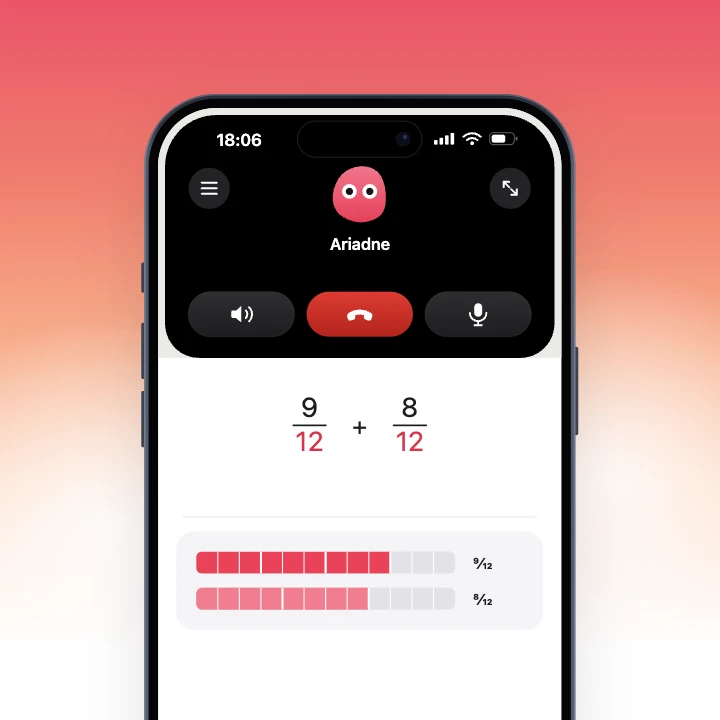 Ariadne Voice: A conversation that follows your thinking
 Learn different: Why we’re building Clarity